The surest car games to play on Chromebook laptops are browser games: they run in a Chrome tab with no install, no extension and no account. Mars Rally Championship, a free browser rally game, is listed first because it is ours: a heavyweight, playable on modest hardware once its graphics are stepped down. Of the rest, PolyTrack is the best time trial, Smash Karts the pick for friends, and Slope, Drift Boss and Moto X3M run on almost anything. On a school Chromebook, each one runs only if the school has not blocked its site.
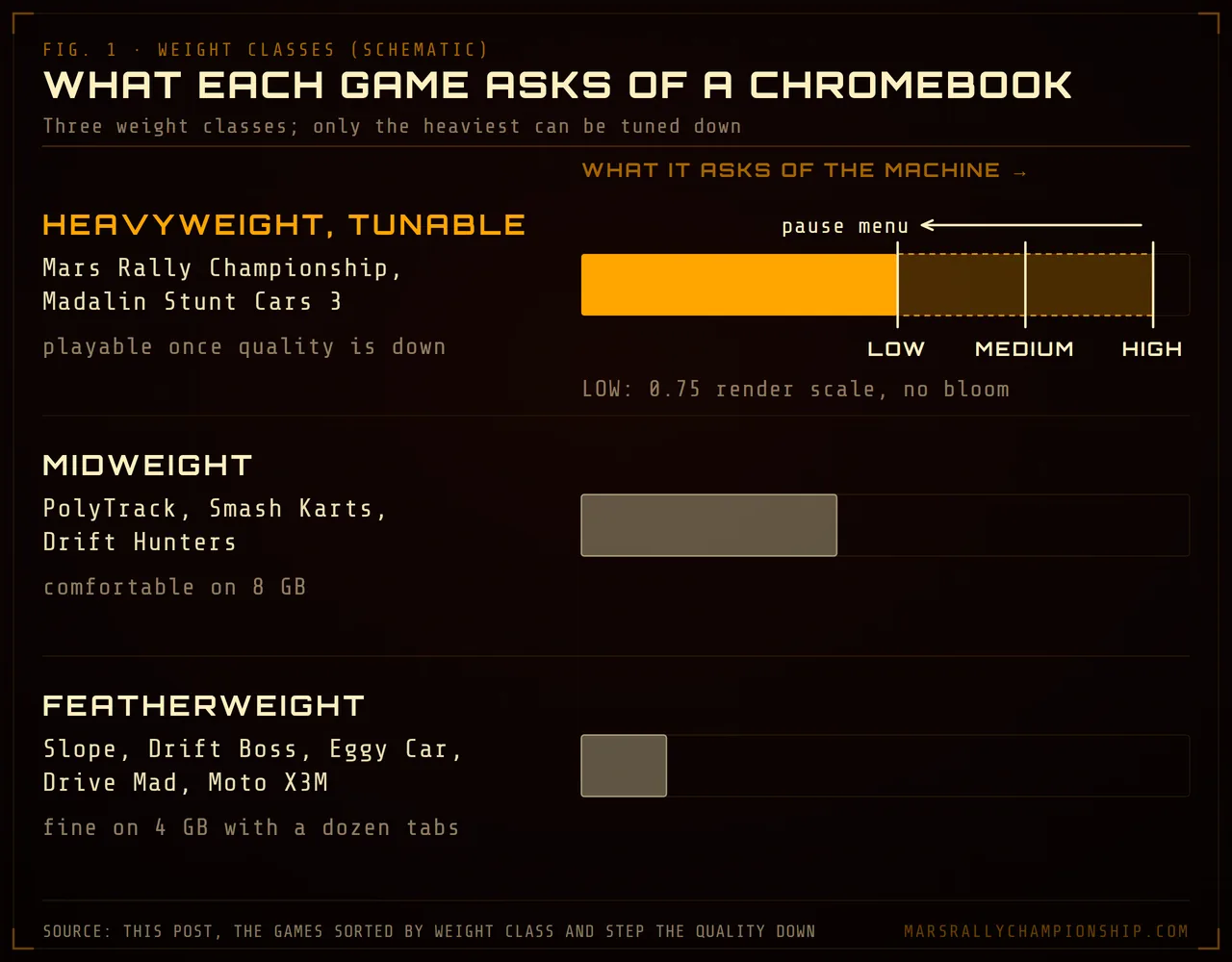
Diagram: only the heavyweights can be tuned down; Mars Rally Championship steps from HIGH to MEDIUM to LOW from the pause menu.
What a Chromebook needs to run 3D car games
The GPU is rarely the first thing to run out
Every Chromebook sold in the last several years ships Chrome with WebGL and hardware acceleration enabled by default, and that is the entire technical requirement for a 3D browser game. No driver, no store, no graphics card. What you have instead is an integrated GPU sharing memory and thermal headroom with everything else the machine is doing — and that sharing, not the chip itself, is usually where the frame rate goes.
RAM is the constraint people underestimate
A 4 GB Chromebook is a common reason a 3D browser game feels broken. The page's geometry, textures and physics state sit in the same pool as ChromeOS and every other open tab. When that pool runs dry, the system spends its time discarding and reloading tabs instead of drawing frames, and the symptom looks like a graphics problem: stutter, long freezes, a tab that reloads itself mid-corner. No quality setting fixes it. Closing the other tabs does, and on a 4 GB machine you want to close all of them.
Pixels are what the GPU pays for
Plenty of Chromebooks pair a modest GPU with a sharp panel, and most of the work in a 3D frame scales with the number of pixels drawn, so a high-resolution display asks several times more of the same chip. This is why render scale — drawing the scene smaller and stretching the result to fit the window — is the most effective setting a browser game can offer, and why well-built ones lower it automatically when frames arrive late.
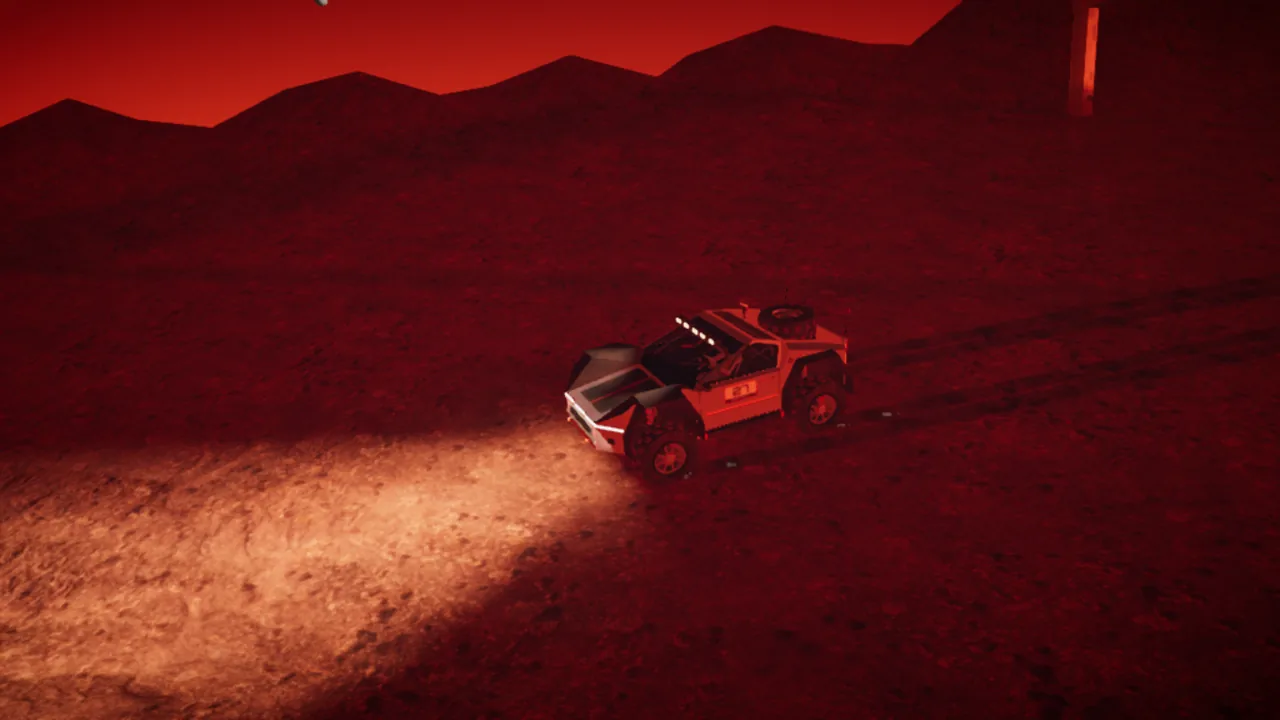
In-game screenshot: a common Chromebook resolution on LOW, where the game draws the scene smaller and stretches it to the window.
Heat and power settings quietly cost you frames
Many Chromebooks are fanless. Sustained 3D load warms the chassis, the chip throttles, and a session that started smooth degrades as it goes on. Battery saver compounds it. If a game felt fine yesterday and does not today, plug the machine in and turn battery saver off before touching a setting.
Why one 3D game runs at full speed and the next one crawls
Triangles are cheap on modern hardware; per-pixel work is not. A low-poly game draws untextured, flat-shaded surfaces once per pixel and then stops, which is why it starts almost instantly and holds a steady frame rate on hardware that struggles with everything else on the list.
A modern-looking 3D game draws the scene from the camera, draws it again from the sun's point of view to build a shadow map, then runs full-screen passes for bloom, color grading and anti-aliasing, each reading and writing every pixel on the display. On a discrete GPU those are nearly free; on integrated graphics they are the frame budget.
That is also the good news: the expensive passes are exactly the ones a quality setting turns off first, so a heavy game with real graphics options is often a better bet than a medium one with none.
Car games for Chromebook, sorted by weight class
These driving games for Chromebook all run in a Chrome tab with nothing installed. Mars Rally Championship is first because it is ours; the rest are sorted by weight class, lightest first. A dash in the controller column means unconfirmed, not no: portal builds change between hosts, so plug a pad in and press a button.
| Game | Weight class | What it draws | What it asks of a Chromebook | Controller? |
|---|---|---|---|---|
| Mars Rally Championship Play | Heavyweight, tunable | 3D with post-processing | Ships on HIGH; steps down to MEDIUM and LOW | Yes |
| Slope | Featherweight | 3D, untextured | Almost nothing; the safest 3D game here | — |
| Drift Boss | Featherweight | 3D, fixed camera | One input, tiny scene | — |
| Eggy Car | Featherweight | 2D physics | Negligible | — |
| Drive Mad | Featherweight | Side-on physics | Negligible | — |
| Moto X3M | Featherweight | 2D physics | Negligible | — |
| PolyTrack | Midweight | 3D low-poly, no post-processing | Modest; untextured tracks load fast | — |
| Smash Karts | Midweight | 3D plus live opponents | Modest GPU and a stable connection | — |
| Drift Hunters | Midweight | 3D with textured car models | More memory than the rest of this tier | — |
| Madalin Stunt Cars 3 | Heavyweight, tunable | 3D, large open map | Sustained load; has in-game graphics options | — |
Ours first: Mars Rally Championship
Our game, listed first for that reason. This is Mars Rally Championship's own site; everything below it is sorted by weight class, not by preference.
It is a heavyweight, but a tunable one: it ships on HIGH and steps down to MEDIUM and LOW from the pause menu, and LOW drops render scale to 0.75 and switches off bloom entirely. Once the quality is turned down it is genuinely playable on modest hardware, and it supports a gamepad.
What it does badly here: on an older Chromebook it needs that step down before it feels right; the first visit fetches about 9 MB of terrain on top of the game itself, which a slow connection will notice; and there are three stages and one rover today.
Play free — no downloadFeatherweight: runs on anything
Slope is an endless downhill run in untextured 3D — one ball, one slope, two steering keys — and it is what to reach for when a machine chokes on everything else. Drift Boss is a single-button drift game with a fixed camera and a scene small enough to be free. Eggy Car, Drive Mad, and Moto X3M are side-on physics games, so their rendering cost is close to zero and all the difficulty is in the design. None of these five will be the reason your Chromebook slows down, and all of them survive 4 GB of RAM with a dozen tabs open.
Midweight: fine on anything from the last few years
PolyTrack, by Kodub, is the best time trial in this tier and the best-behaved 3D game on the list: untextured low-poly tracks, no post-processing, medal times on every track, and an editor so the supply of tracks never runs out. It was still being updated in September 2026; the developer's itch.io page runs it in the browser. Smash Karts is a kart battle arena for up to eight players, the quickest way to get several people into one match, and an online game, so it needs a steady connection. Drift Hunters is the heaviest of the three, because textured car models cost memory. On 8 GB, all three are comfortable.
Heavyweight but tunable: the quality setting is the point
Madalin Stunt Cars 3 puts a lot of open map on screen at once and exposes graphics options to deal with it; Mars Rally Championship has its pause-menu quality button. Both are genuinely playable on modest hardware, and both feel bad if you never turn the quality down. Performance in this tier is a choice you make, not a verdict the hardware hands you.
On an older Chromebook, step the quality down first
Mars Rally Championship ships on HIGH, which is the right default for a desktop and the wrong one for an older Chromebook. The pause menu has a quality button that steps HIGH → MEDIUM → LOW, and pressing it twice is the first thing to do on any machine that stutters. The quality button lives only there: the settings screen covers the camera, audio, controls and accessibility, not graphics.
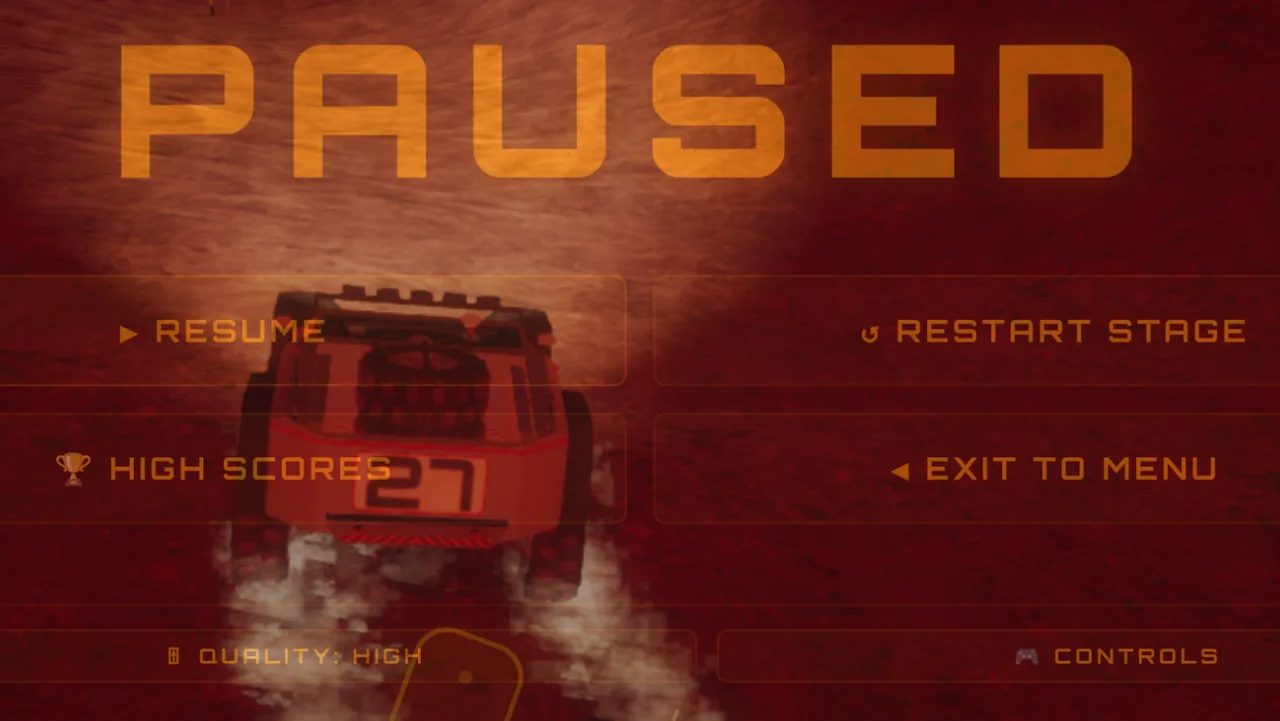
In-game screenshot: the QUALITY button lives only in the pause menu; each press steps the preset down and applies on the next frame.
Here is what each step changes. HIGH renders at full resolution with the device pixel ratio capped at 1.5, the full color grade, bloom, and 2048-pixel shadow maps; MEDIUM caps the pixel ratio at 1.0 and drops shadows to 1536. LOW is the one that matters on weak hardware: render scale falls to 0.75, bloom is switched off entirely, and shadow maps drop to 1024, which removes the bloom pass and cuts the pixels drawn by about 44%.
Dynamic resolution scaling runs on top of all three presets, trimming resolution on its own when frames arrive late, but it cannot undo a preset that is too expensive to begin with, so step down by hand. The rest of the routine is the boring part that works: close the other tabs, plug the machine in, and give the game its own window.
Controllers, keys, and putting the game on your shelf
A USB or Bluetooth gamepad works on ChromeOS
Chrome implements the Gamepad API on ChromeOS the same way it does everywhere else, so a controller connected over USB or paired over Bluetooth is available to any page that reads it. One quirk catches everyone: the browser does not report a pad until it sends input, so press a button after plugging it in.
In Mars Rally Championship the left stick steers and RT and LT are throttle and brake. Analog triggers are the real win here: they give you partial brake pressure, which a keyboard cannot. The full mapping and tuning are in racing with a controller in the browser.
The keyboard mapping, for when there is no pad
The up arrow is throttle, the down arrow is brake, the left and right arrows steer, Space is the handbrake, A shifts up and Z shifts down. C cycles the fifteen cameras, P pauses, R restarts, and T takes you back to the last gate you cleared. The five driving actions and the two gear keys are rebindable — worth doing on cramped half-height arrow keys.
Drifting in a Chromebook browser
Drift games are among the easiest car games to find in a browser, and they sort by the same weight classes. Drift.io is reviewed by drifted.com as running in PC, Chromebook and mobile browsers; Drift Hunters is desktop-only in the browser, with phone apps instead. Mars Rally Championship is a rally game rather than a scored drift game, but it slides: Space or A on a pad pulls the handbrake, which locks the rear wheels, and it needs a browser with WebGL 2, so keep Chrome up to date. The free online drifting games guide checks each one for downloads, sign-ups, ads and controllers.
Installing a browser game to the shelf
Mars Rally Championship is a progressive web app, so ChromeOS can install it: use the install option in the address bar or the browser menu, and it gets a launcher icon you can pin to the shelf and its own window, with no tabs or address bar. It still downloads no executable and asks for no account. On a school Chromebook the admin may have installs switched off; a bookmark gets you the same game in a tab.
Racing games for school Chromebooks
A school Chromebook runs whatever policies the school's IT team sets in the Google Admin console, and those decide what you can play long before the graphics do. Admins can allow or block websites, choose which apps and extensions students may install from the Chrome Web Store, switch Android apps off or show only approved ones in Google Play, keep Linux turned off, and restrict who can sign in. Many schools filter the network as well.
What a no-install browser game needs
Many car games recommended for Chromebooks may not run on a school one: Android racing games come from Google Play, and plenty of car games are Chrome Web Store extensions, both things a school can switch off. A browser game that needs no install, no extension and no account asks for less: a tab, WebGL for the 3D ones, and a site the school has not blocked. Every game here is that kind.
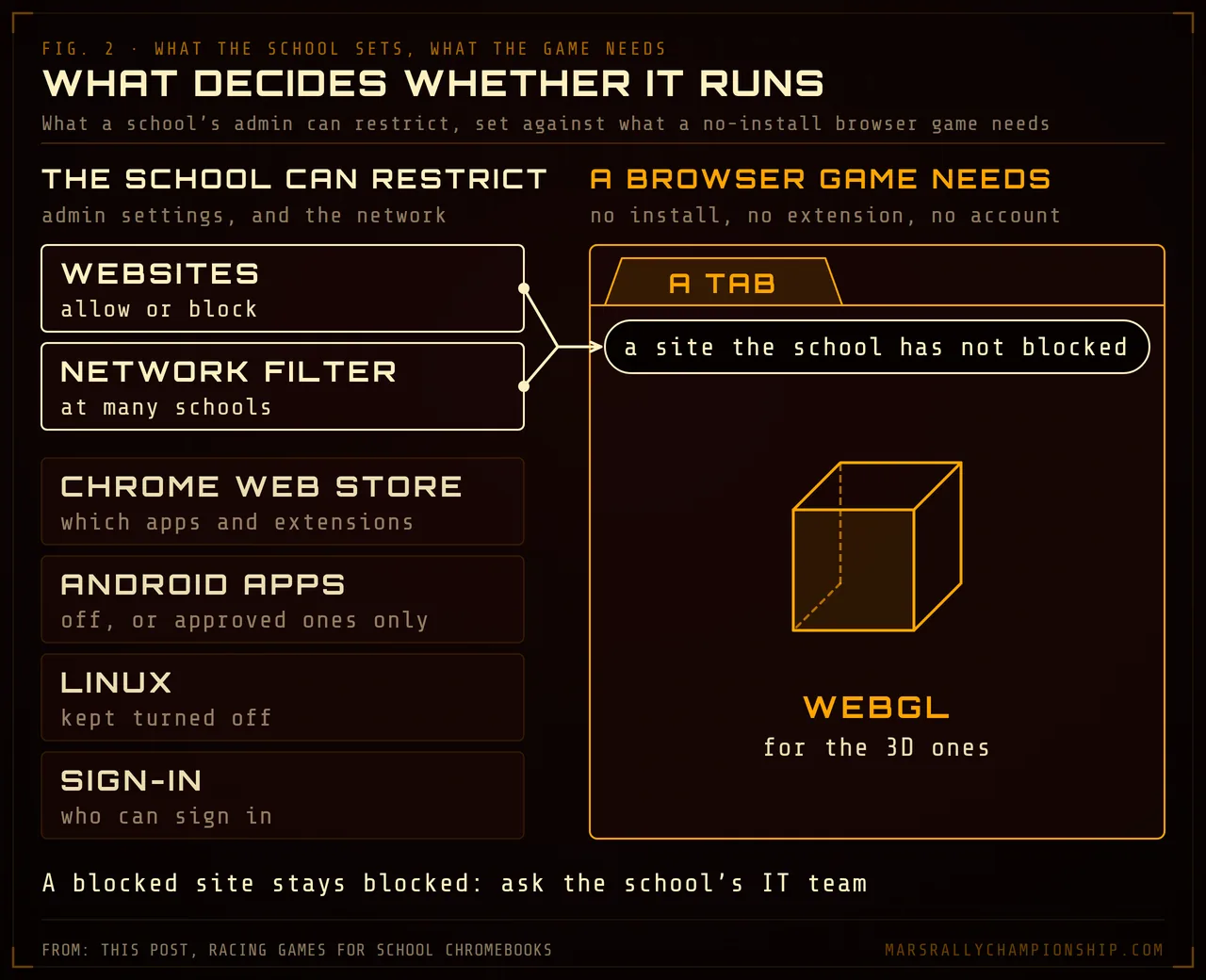
Diagram: what a school-managed Chromebook can restrict, set against what a no-install browser game needs: a tab, WebGL for 3D, and a site the school has not blocked.
A blocked site stays blocked
A game cannot get itself past a block, and this page links no unblocked mirrors, proxies or VPNs. If the school has blocked a site, it stays blocked on that Chromebook, and a blocklist set in the Admin console can apply at home as well as at school. Needing no account does not keep Mars Rally Championship off a block list either. Ask the school's IT team whether a game can be allowed, or play at home on your own computer; where it does load, play when games are allowed.
What the game sends
Mars Rally Championship needs no account, so there is nothing to sign up for, but schools are right to ask what a site sends. When a drive ends, the game sends the line the rover took, its position and speed with a device id but no call sign and no account; it is kept for a month and never published. Settings → SHARING DRIVE PATHS turns that off on the device, every leaderboard time is stored with the input recording that verifies it, and the privacy page has the rest.
With no account, progress lives in that browser, so a Chromebook set to erase local user data at sign-out starts you from zero each time. In live races other pilots see your call sign, PILOT by default, which never needs to be your name.
Where to start on a Chromebook
If your machine is old or has 4 GB of RAM, start in the featherweight tier. If it is newer, the heavyweights are open once you turn the quality down. Mars Rally Championship is free, needs no account, and runs in a browser tab: start driving, or try the daily challenge, one stage and sky for everyone each day. The wider list of free browser racing games covers the games above in more detail, and playing on a phone is the companion piece for the tablet-mode half of your Chromebook; mobile browser racing games covers the racing games that run in a phone or tablet browser. The browser racing game compatibility table sets controller, touch and Chromebook weight class side by side. If the old machine runs Windows or Linux instead, racing games for low-end PCs and old laptops checks each free download's published minimum spec.