Browser games support controllers through the Gamepad API, which every current desktop browser implements. The catch that trips up almost everyone: the browser will not show a page your pad until you press a button on it. The API only exposes gamepads after a user gesture, so a pad that is plugged in, paired and lit up still reads as absent. Connect over USB or Bluetooth, load the page, press A. Mars Rally Championship, a free browser rally game, accepts any pad reporting at least six buttons and two axes.
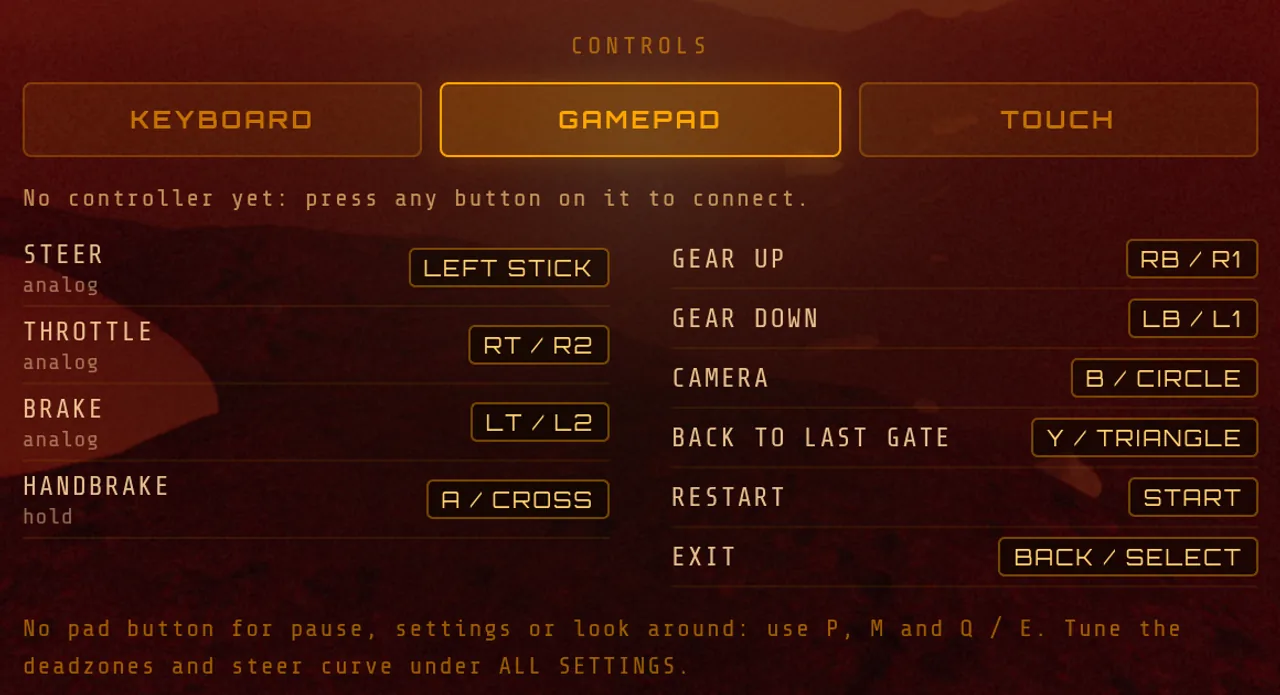
In-game screenshot: until a button is pressed the page cannot see the pad, and the GAMEPAD tab says so in its status line.
Press a button first — this is the whole trick
navigator.getGamepads() returns an array as soon as you ask for it, but the slots stay empty until the browser has seen you use the device. Chrome, Edge, Firefox and Safari all gate the pad list behind that first press, so nothing is broken while you wait — the browser has not decided you are a gamepad user yet.
The reason is fingerprinting: a pad exposes an id string with vendor and product codes, a button and axis count, and sometimes a vibration actuator — enough to help identify a machine across sites. Browsers withhold it until you show intent, as MDN's guide to using the Gamepad API describes. Two rules follow from that: the tab must be focused, so a pad "stops working" when you alt-tab to a chat window, and a cross-origin iframe is gated by a permissions policy, so a game embedded on an aggregator portal may never see your pad even though it works at its own address.
Mars Rally Championship polls the pad list every rendered frame rather than trusting the gamepadconnected event, so a pad you wake mid-stage is picked up on the next frame. Where navigator.getGamepads is missing — iOS Safari up to 14 — or throws, the subsystem switches itself off and keyboard and touch carry on.
Connecting over USB and Bluetooth
Start with USB when something is wrong: a wired pad has no pairing state to go stale, and Bluetooth's small but real added latency disappears.
On Windows, Xbox controllers work over USB with no driver install. Xbox Wireless Controllers made from 2016 onward pair over Bluetooth from Settings; earlier revisions need the cable or an Xbox Wireless Adapter. A DualSense or DualShock 4 pairs by holding PS and Create/Share. On macOS, Xbox Bluetooth models and PlayStation pads pair from System Settings and arrive as ordinary gamepads.
On ChromeOS both routes work and Chrome's Gamepad API is fully present, which makes a Chromebook a better racing machine than its spec sheet suggests — the longer argument is in the guide to racing games for a Chromebook browser. On Android, Chrome supports the API, most pads pair from system settings, and USB-OTG works; phones otherwise get touch controls, covered in playing on your phone.
Standard mapping, and the pads that do not report it
The Gamepad specification defines a "standard gamepad": fixed indices for a two-stick, four-shoulder, four-face-button layout. Button 0 is the bottom face button, 4 and 5 the bumpers, 6 and 7 the triggers, 8 and 9 Back and Start, axes 0 and 1 the left stick. A browser that recognises a device remaps its raw HID report onto that layout and sets the pad's mapping property to "standard". The W3C Gamepad specification is the authority on which index is which.
Almost every modern console pad reports standard: Xbox, DualSense, DualShock 4, Switch Pro, and well-behaved third parties like 8BitDo. What does not is anything the browser has no remapping table for — arcade sticks, flight yokes, no-name USB pads, most racing wheels. Those report an empty mapping and hand you their buttons in whatever order the driver enumerated them. Mars Rally Championship reads those fixed standard indices, so a non-standard pad does something, just not what the label says. Wheels with pedals are not supported.
How to tell the page has actually seen your pad
Mars Rally Championship shows a small GP badge carrying the controller's reported name, trimmed of the vendor suffix some browsers append. If the badge is there, the pad is live and being polled.
The second signal is the controls list. Settings, the in-game M panel and the pause menu's CONTROLS button each list every control for keyboard, gamepad and touch, and once a pad is connected the list opens on its GAMEPAD tab, where a status line reads "Connected:" and the same name the badge shows. Until the page has seen a pad, that line reads "No controller yet: press any button on it to connect."
The Proving Ground tutorial gives a third signal. With a pad connected, its cards name the pad's buttons as the controls list captions them — RT / R2 for throttle, A / CROSS for the handbrake — instead of keyboard keys, and switch back to the keys if the pad drops. If none of the three has changed, the page has not seen the pad yet.
The full control map
| Action | Gamepad | Keyboard |
|---|---|---|
| Steer | Left stick X (analog) | ← / → |
| Throttle | RT / R2 (analog) | ↑ |
| Brake and regen | LT / L2 (analog) | ↓ |
| Handbrake | A / Cross (held) | Space |
| Cycle camera | B / Circle | C (Shift+C back) |
| Gear down | LB / L1 | Z |
| Gear up | RB / R1 | A |
| Restart the stage | Start | R |
| Exit to the site | Back / Select | Esc twice (the first press pauses) |
| Look left / right | — | Q / E |
| Back to the last gate | Y / Triangle | T |
| Pause | — | P |
| Settings | — | M |
The stick steers the way it is pushed. Before 2026-09-27 it steered mirrored, so pushing left turned the rover right.
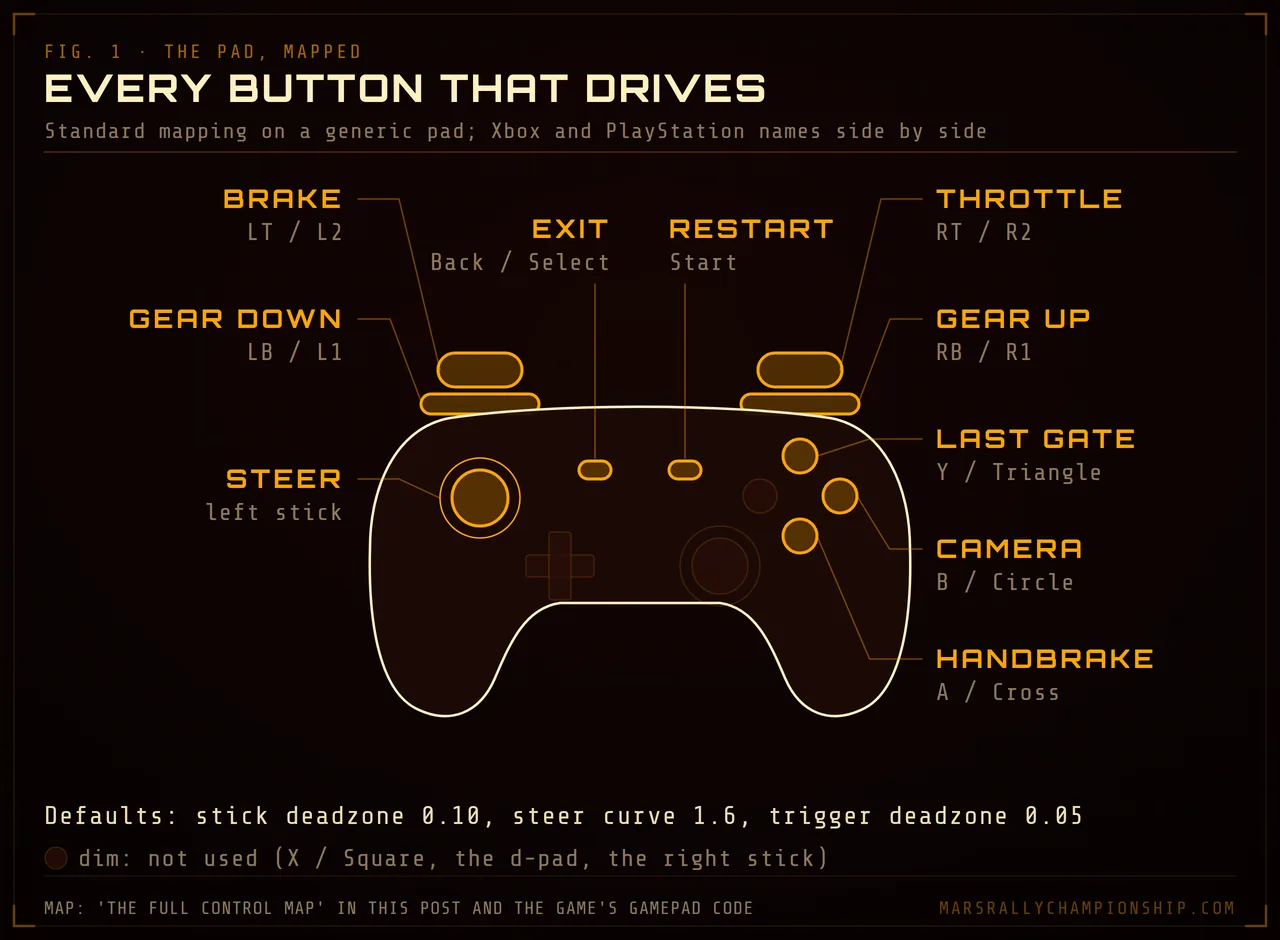
Diagram: the game reads the standard mapping, so these positions hold on any pad that reports it, whatever is printed on the buttons.
Both bindings are live at once, and the merge is deliberately dumb in the good sense: throttle, brake and handbrake take the larger of the keyboard and gamepad values, so any source overrides idle and nothing fights, while steering prefers the pad whenever the stick is off centre, then the touch track, then the arrow keys. The handbrake is read as a held button every frame; camera, gears, recovery, restart and exit are edge-detected one-shots gated by game state, so Back exits only while driving or from the results screen, and a stray thumb on it while paused does nothing.
What the three tuning settings actually do
Three gamepad values are adjustable and persist between sessions. They sit under TUNING on the GAMEPAD tab of the panel M opens in-game; from the settings screen, ALL SETTINGS opens the same panel.
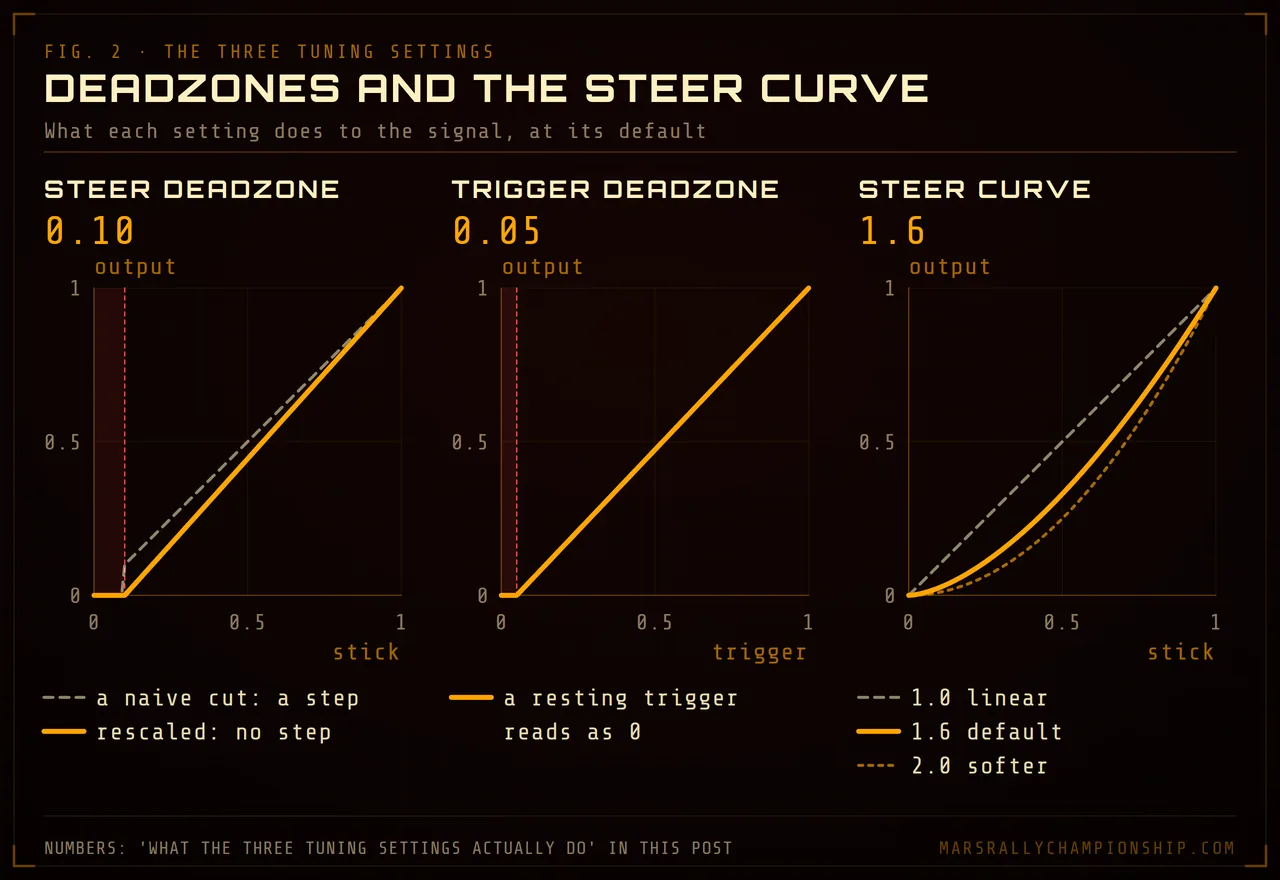
Diagram: deadzones zero the resting travel without a jump at the edge, and a curve above 1.0 softens the centre while full lock stays full lock.
Steer deadzone, default 0.10. Below that fraction of stick deflection, steering input is zero. Above it, the remaining travel is rescaled so output ramps from zero at the deadzone edge to full lock — no step at the boundary, which is what a naive deadzone gets wrong. Raise it if a worn stick makes the rover wander on a straight; lower it if small corrections go nowhere.
Trigger deadzone, default 0.05. The same treatment for RT and LT. Triggers rest at a small non-zero value on plenty of pads, and 5% stops a resting trigger feeding a trickle of throttle into a stationary rover — which matters here, because the repair zone only works stopped.
Steer curve, default 1.6. An exponent applied to the stick value after the deadzone: output is input raised to that power, sign preserved. 1.0 is linear. Above 1.0 the response near centre softens while full lock stays full lock, so the first third of travel steers less and small inputs get precise. That is the setting people want when they say a car feels twitchy, and it redistributes the 0.85 rad steering lock rather than shrinking it. To feel the difference, drive the tutorial — the Proving Ground's slalom and chicane make centre-feel obvious fast. The tutorial's lessons accept the pad, and START presses NEXT on its welcome and finale cards.
Troubleshooting
The browser does not see the controller at all
Press a face button with the game tab focused. That fixes it more often than everything else combined. Otherwise: check the pad is not still paired to a console powering it on remotely, re-seat or swap the USB cable, since charge-only cables are common, and confirm on a generic gamepad test page, the kind listing every connected pad with live readouts. On Windows, a mode-switch pad belongs in XInput, not DirectInput. If a test page sees the pad and another game still ignores it, that game may not read pads at all; browser games with controller support lists the ones that do, each with its source.
The throttle is on or off with nothing in between
Your pad is not reporting standard mapping, so its analog triggers are landing somewhere other than buttons 6 and 7 — often as extra axes, or as digital buttons that only read 0 or 1. A standard pad reports a trigger as a button with an analog value from 0 to 1, which is what the game reads. Switching a mode-switchable pad into XInput usually fixes it; failing that, keyboard throttle works alongside pad steering.
The rover drifts on a straight with the stick untouched
Stick drift — a hardware wear pattern, not a software bug. Raise the steer deadzone in small steps until the car tracks straight with your thumb off the stick, and no further: every increment is travel you lose for fine corrections.
The car is too twitchy to place accurately
Raise the steer curve exponent. Going from 1.6 to about 2.0 changes how much stick you can use before the front end bites, and costs nothing at full lock. Twitchiness that survives that is driving input, not hardware — total grip on Mars is roughly 3.1 m/s², so fast hands unload the tires. The fix is in how to get faster at rally driving games.
Where to try this
Mars Rally Championship runs at /play with no download, no install and no account, so testing a controller costs one button press. Tune the pad in settings, learn the car in the Proving Ground tutorial, and read the beginner's guide before your first timed run. On a school or work machine, the Chromebook guide covers the rest.